
Fortune Hunters guide

Discord Slash Command Game

Players use familiar Discord slash commands and interactive buttons to start, claim rewards, hunt, open boxes, manage inventory and progress through the RPG.

Discord Slash Command Game artwork

What server owners get

Fortune Hunters is a Discord slash command game with /play onboarding, /daily rewards, /hunt loot, /open boxes, /profile stats and interactive RPG systems.

/play command icon
Getting Started

/play

Creates new profiles automatically and opens the adventure hub.

Use
Use `/play` to start or continue your Fortune Hunters adventure.
New player timing
Use this first, then follow `/hunt`, `/open`, `/daily`, and `/help`.
Requirements
None.
Cost or cooldown
None / None found
Rewards or outcomes
New players receive 500 Coins, 1 Wooden Box, 1 Knife, 1 Energy Pill, and EnergyRegen level 1. Existing players see their continue hub.

/tutorial command icon
Getting Started

/tutorial

Interactive onboarding with buttons and pages that explains the first loop.

Use
Use `/tutorial`, choose Quick Start or Extended Intro, then read through the optional guide.
New player timing
The tutorial is optional. EnergyRegen starts unlocked for free.
Requirements
None. `/play` creates your profile automatically if needed.
Cost or cooldown
None / None found
Rewards or outcomes
Explains the first loop and points players toward `/play`, `/hunt`, `/open`, `/daily`, and `/help`.
/daily command icon
Economy

/daily

Claim daily rewards.

Use
Use `/daily` once per day.
New player timing
A simple retention loop: claim daily, then spend coins on shops, lottery, upgrades, or supplies.
Requirements
Profile started automatically by `/play`.
Cost or cooldown
None / Daily
Rewards or outcomes
Coins, boxes, and VIP daily benefits when eligible.
/hunt command icon
Hunting and Fishing

/hunt

Spend energy to hunt for boxes, animals, items, and location drops.

Use
Use `/hunt` after equipping a hunting weapon.
New player timing
Hunting weapon choice changes odds. Excalibur can reach 2% Emerald Box chance in the current table.
Requirements
Profile started, at least 1 Health, at least 1 Energy.
Cost or cooldown
1 Energy / 1 minute
Rewards or outcomes
Boxes, rare location items, animal materials, XP, or health-loss events.
/open command icon
Boxes and Loot

/open

Open boxes for currencies, weapons, vehicles, items, and rare rewards.

Use
Use `/open box:<box type> amount:<amount>`.
New player timing
Emerald, Treasure, Vote, VIP, Pill, and Matryoshka boxes each point at different progression goals.
Requirements
Own boxes.
Cost or cooldown
None / None found
Rewards or outcomes
Box-specific rewards from OpenBoxes.cs, including common supplies and rare late-game items.
/inventory command icon
Inventory and Items

/inventory

Interactive inventory for items, boxes, weapons, and vehicles.

Use
Use `/inventory`, then use dropdowns/search/buttons to browse categories.
New player timing
Use inventory before selling, opening boxes, equipping weapons, or using consumables.
Requirements
Profile started.
Cost or cooldown
None / None found
Rewards or outcomes
Shows owned resources with pagination, category dropdowns, search, clear, and close controls.
/upgrade command icon
Profile and Progression

/upgrade

Spend upgrade points on Health, Strength, Accuracy, Energy, or EnergyRegen.

Use
Use `/upgrade` or `/upgrade category:EnergyRegen`.
New player timing
Spend points on any category. EnergyRegen starts unlocked for free and can still be upgraded later.
Requirements
Upgrade points. The first earned point arrives at Level 2.
Cost or cooldown
None / None found
Rewards or outcomes
Improves stats; EnergyRegen gives +1 Energy per 10 minutes per upgrade.
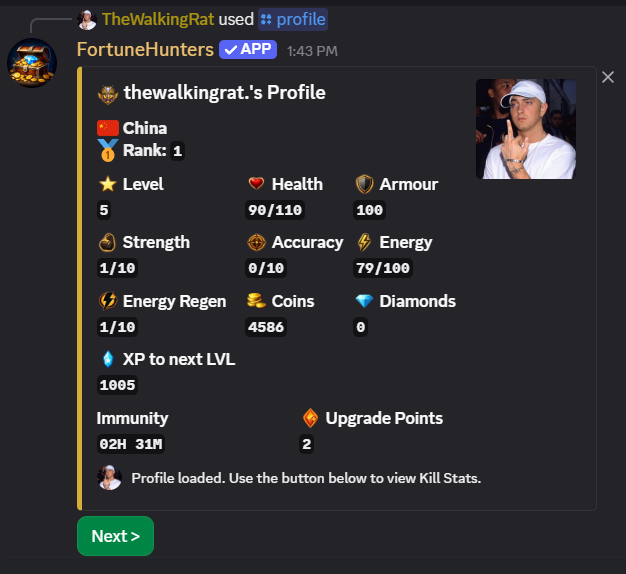
/profile command icon
Profile and Progression

/profile

View player stats, currency, combat records, location, and progression.

Use
Use `/profile` to inspect your current character state.
New player timing
Use this to decide whether you should train, heal, upgrade, travel, or fight.
Requirements
Profile started automatically by `/play`.
Cost or cooldown
None / None found
Rewards or outcomes
Shows level, XP, coins, diamonds, health, energy, kills, deaths, damage stats, and more.

Why slash commands help onboarding

Slash commands make the first session easier because Discord shows command names directly. Fortune Hunters leans into that with /play, optional tutorial guidance, interactive inventories and buttons for common actions.

Related Discord bot guides

Explore the Fortune Hunters SEO hub

These pages explain the same bot from different search intents, with real commands, systems and assets.

Discord RPG bot

Profiles, XP, Energy, levels, upgrades and long-term progression.

Discord PvP bot

Weapons, ammo, armour, bounties, kill immunity and combat stats.

Discord loot bot

Hunting, fishing, boxes, rare drops, items, weapons and vehicles.

Bring the adventure to your server

Start hunting, trading, fighting, and building today.

Invite Bot
Invite Bot